ABS Private cheat for Escape from Tarkov on Windows
Updating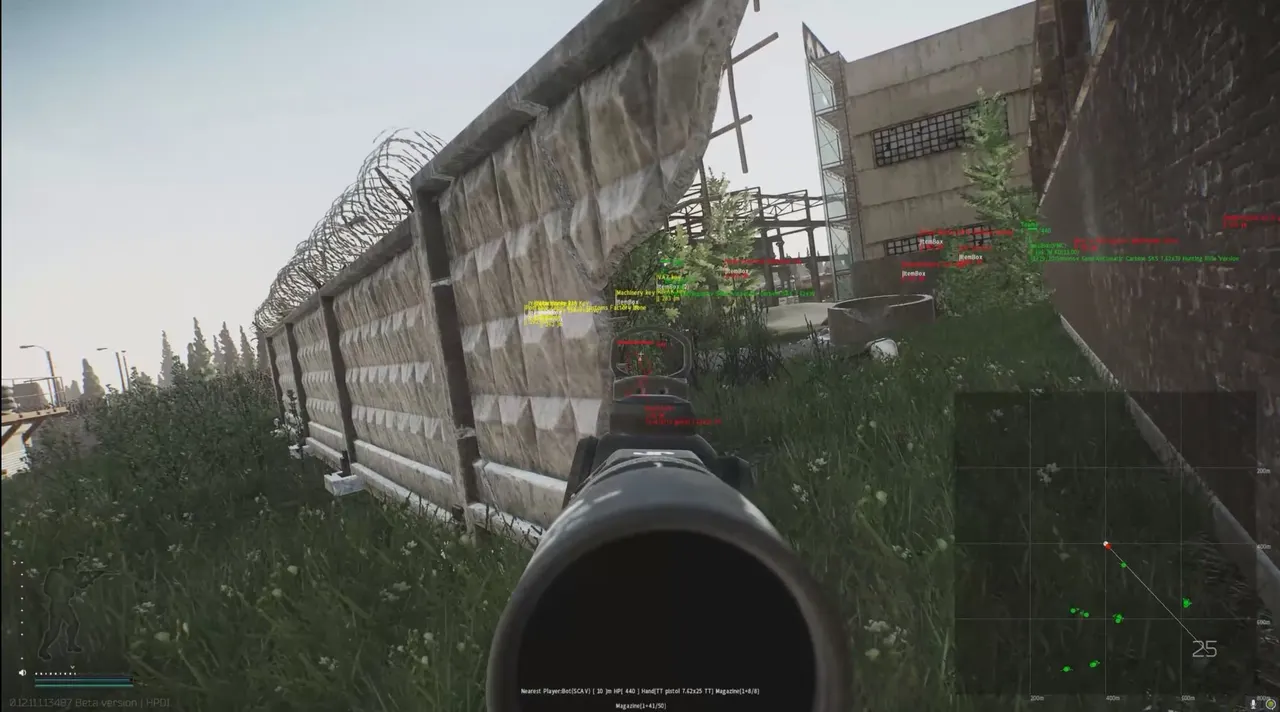



ABS PRIVATE is being updated: the developer is releasing a new version. Sales resume as soon as it is out.
Ask about timingABS Private for Escape from Tarkov: system requirements
About ABS Private for Escape from Tarkov
ABS Private is a cheat for Escape from Tarkov that highlights players at distances from 200 to 1000 meters. The wallhack shows boxes, skeleton, health, weapon in hand, K/D and corpses, and the visibility check colors a player red when they enter your character's line of sight.
Loot highlighting is split into categories: keys, keycards, weapons and mods, grenades, armor, ammo, meds, food, water, materials and documents. Valuable items are highlighted in pink and very valuable ones in red, and you build your own list of valuable loot. Loot in containers, inventory, quest items and extracts are also visible, and there is a radar, a crosshair and a danger alert.
It requires Windows 10 or 11, Intel or AMD, and the game in windowed or borderless mode. There is no built-in spoofer, no USB flash drive is needed, and the cheat is hidden from OBS recordings.
Features of ABS Private for Escape from Tarkov
- "Player highlight:" shows players in the ESP and helps you keep track of their positions around your character.
- The "Boxes" setting controls the matching product parameter.
- Shows the target's skeleton so you can read its position and movement faster.
- "Visibility check (the color turns red if the player is in your line of sight)" shows players in the ESP and helps you keep track of their positions around your character.
- The "Health" setting controls the matching product parameter.
- Adds the "Weapon in hand" category to the loot filter, so the items you need are found faster.
- The "K/D (kill/death ratio)" setting controls the corresponding product option.
- The "Bodies" setting controls the matching product parameter.
- "Highlight distance 200-1000 meters" highlights the selected models with a bright material for better visibility.
- Adds the "Loot highlight:" category to the loot filter so you can find the items you need faster.
- The "Keys" setting controls the corresponding product option.
- The "Keycards" setting controls the corresponding product option.
- Adds the "Weapon" category to the loot filter, so the items you need are found faster.
- The "Weapon mods" setting controls the corresponding product option.
- The "Grenades" setting controls the matching product parameter.
- The "Armor" setting controls the matching product parameter.
- Adds the "Ammo" category to the loot filter, so the items you need are found faster.
- The "Medical" setting controls the corresponding product option.
- The "Food" setting controls the matching product parameter.
- The "Water" setting controls the matching product parameter.
- "Highlight radius" highlights the selected models with a bright material for better visibility.
- The "Various materials" setting controls the corresponding product option.
- The "Documents" setting controls the matching product parameter.
- The "Other" setting controls the corresponding product option.
- The "Extra features:" setting controls the corresponding product option.
- Puts nearby targets on the radar and makes it easier to watch every direction.
- Adds the "Loot highlight in containers" category to the loot filter so you can find the items you need faster.
- "Inventory highlight" highlights the selected models with a bright material for better visibility.
- The "Show valuable items in pink" setting controls the corresponding product option.
- The "Show very valuable items in red" setting controls the corresponding product option.
- Adds the "Set up your own valuable loot list on the website" category to the loot filter so you can find the items you need faster.
- Adds the "Show quest items" category to the loot filter so you can find the items you need faster.
- The "Show extracts" setting controls the corresponding product option.
- The "Crosshair" setting controls the matching product parameter.
- The "Danger alerts" setting controls the corresponding product option.