Coffee Chams cheat for Escape from Tarkov on Windows
Undetected
Purchase
Coffee Chams for Escape from Tarkov: system requirements
About Coffee Chams for Escape from Tarkov
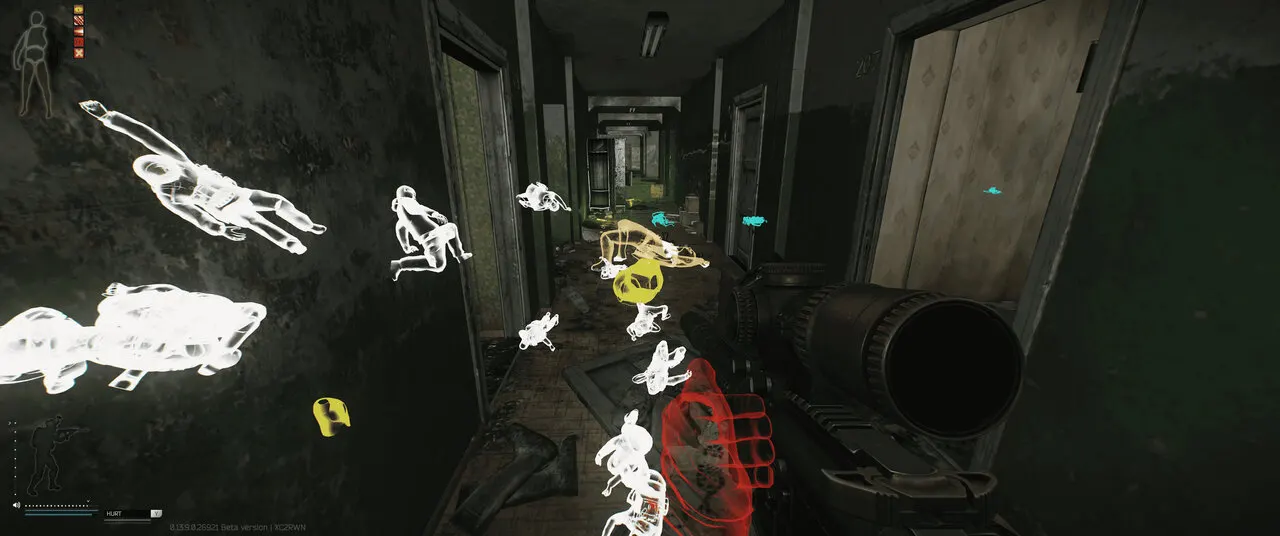
Coffee Chams is a cheat for Escape from Tarkov where the wallhack is built on Chams: enemies, your own model, loot items and corpses are highlighted in color. The second part of the build covers weapons and movement.
No recoil can be enabled fully or through a recoil percentage, and sway is removed separately. The visor effect, pain effects and sprint inertia disappear, and stamina never runs out. The field of view is set separately for normal mode and aiming, a zoom helper magnifies the image, and a light source can be turned on with adjustable brightness and range.
The cheat works on Windows 10 (2004–22H2) and Windows 11 with Intel and AMD processors when the game is open in borderless or windowed mode. The computer must boot in UEFI with Secure Boot disabled, and the disk must use GPT partitioning. A spoofer is not included, no USB flash drive is required, and the cheat does not bypass OBS recording.
Features of Coffee Chams for Escape from Tarkov
- The "Inf. Stamina" setting controls the matching product parameter.
- The "No Sway" setting controls the matching product parameter.
- "No Recoil" reduces recoil and helps keep your weapon steadier while firing.
- The "No Visor" setting controls the matching product parameter.
- The "Zoom helper" setting controls the matching product parameter.
- "Normal FOV selector" sets the size and max range of the selected module's working area.
- "Aiming FOV selector" sets the size and max range of the selected module's working area.
- "Modify Recoil" reduces recoil and helps keep your weapon steadier while firing.
- "Recoil Percent selector" reduces recoil and helps keep your weapon steadier while firing.
- The "No Pain Effects" setting controls the matching product parameter.
- The "No Sprint Inertia" setting controls the matching product parameter.
- The "Light Source on/off" setting controls the matching product parameter.
- The "Light Source intensity" setting controls the matching product parameter.
- The "Light Source range" setting controls the matching product parameter.
- "Enemy Chams" highlights the selected models with a bright material for better visibility.
- Shows players in ESP and helps you keep track of where they are around your character.
- Adds the "Loot Item Chams" category to the loot filter, so the items you need are found faster.
- "Corpse Chams" highlights the selected models with a bright material for better visibility.