
Unicore cheat for Honkai: Star Rail on Windows
Undetected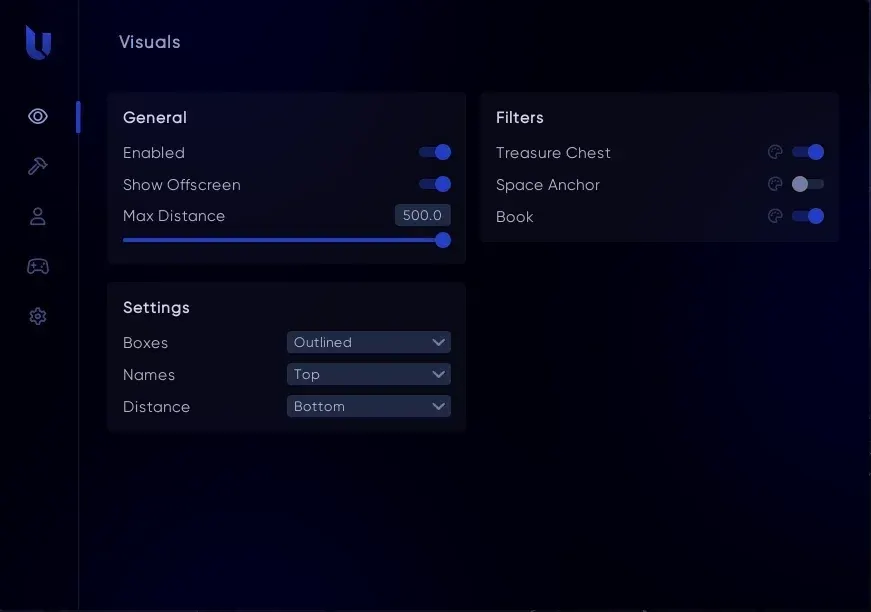



Purchase
Unicore for Honkai: Star Rail: system requirements
About Unicore for Honkai: Star Rail
The private cheat Unicore helps you explore the world, farm and clear battles faster in Honkai: Star Rail on PC.
The ESP shows chests, Space Anchors and books with name, distance, a box and arrows to objects beyond the screen edge, and the object builder lets you create your own ESP from item name hashes. For movement, there is a teleport with binds and NoClip through walls. Gameplay features include game and battle speedup, auto battle and combat exit unlocks, passive enemies in the open world, auto-loot within a 30 m radius, auto dialogue, up to 360 FPS, UID and local time changing, and censorship removal.
Supports Windows 10 (2004–22H2) and Windows 11, Intel or AMD, and any window mode. No built-in spoofer or OBS hiding; the game has its own anti-cheat, so the ban risk remains.
Features of Unicore for Honkai: Star Rail
- set which objects and labels the ESP displays.
- arrows point to objects beyond the screen edge.
- distance to each highlighted object.
- boxes around objects, outlined or thin.
- labels with object names.
- highlights treasure chests.
- highlights teleport points on the map.
- shows books you can collect.
- lets you build your own ESP from item name hashes.
- moves your character around the map; points are assigned to binds.
- your character passes through walls and obstacles.
- increases the overall game speed.
- shortens turn-based battles.
- removes censorship from the game.
- removes the frame rate cap, up to 360 FPS.
- changes the displayed UID and profile data.
- enemies in the open world stop reacting to your character.
- automatically collects loot within a 30 m radius.
- enables auto battle where it is normally unavailable.
- lets you leave a battle even if the exit button is locked.
- dialogue lines are selected and skipped automatically.
- changes the local in-game time.