
EXLAB Desync lag switch for Windows
Undetected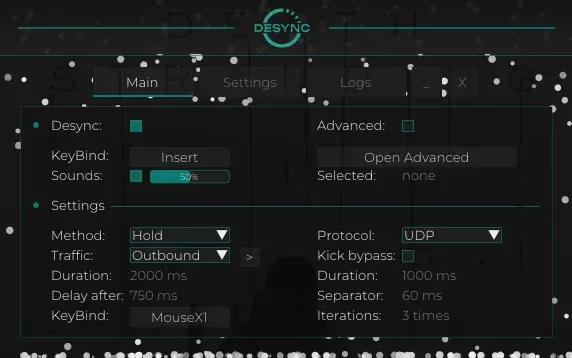



Purchase
Setup instructions
EXLAB Desync: system requirements
About EXLAB Desync
EXLAB Desync is a Lag Switch for Windows that triggers desync by blocking incoming or outgoing traffic with a hotkey. There are three activation methods: Temporary keeps the block for a set time, Pressing until the key is pressed again, and Hold while the key is held down. There is no wallhack and no aimbot here: the program works only with the network.
You can configure the duration, the delay before reactivation, the protocol and duration randomization. Firewall mode works through the firewall instead of a driver, and for it you specify the path to the game file. Kick bypass splits the block into repeats with pauses so the game does not kick you for a bad connection. There are sounds, a traffic restore button, config saving and activation logs.
It works on Windows 10 and 11 with Intel and AMD processors in windowed, borderless and fullscreen modes. The program has no spoofer, and no USB flash drive is needed.
Features of EXLAB Desync
- The "Main tab" setting controls the matching option of the product.
- activates the features.
- hotkey to activate the features.
- Sound cues for actions (activation, etc.).
- works through the firewall instead of a driver.
- path to the target executable / game, works together with Firewall mode.
- choose the activation method:.
- The "Temporary: desync works according to the time settings" setting controls the matching option of the product.
- The "Pressing: works until you press the activation key again" setting controls the matching option of the product.
- The "Hold: works while the activation key is held down" setting controls the matching option of the product.
- choose which traffic to block:.
- The "Outbound: outgoing traffic" setting controls the matching option of the product.
- The "Inbound: incoming traffic" setting controls the matching option of the product.
- desync duration (without kick bypass, for the temporary method).
- delay after a block before you can activate desync again.
- hotkey to activate desync (the main blocking key).
- choose which protocol to block:.
- bypasses getting kicked from the game for a bad internet connection:.
- Duration: how long one block repetition lasts, Separator: the time gap between blocks, iterations: how many times the block duration repeats (Duration * Iterations), Settings tab.
- randomizes the block duration.
- a button that "heals" your internet connection if something goes wrong.
- saves the current configuration.
- resets the current configuration to the default settings.
- shows logs when a block is activated.
- deletes the log files.
- log file.
- shows information about how the program is working.