AI Aimbot cheat for PUBG: Battlegrounds on Windows
Undetected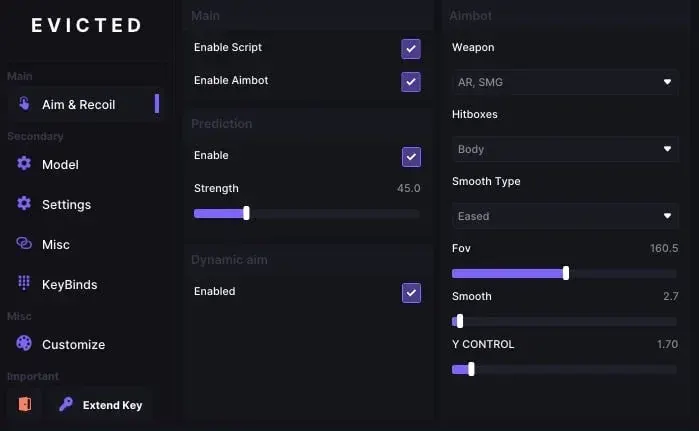
Purchase
AI Aimbot for PUBG: Battlegrounds: system requirements
About AI Aimbot for PUBG: Battlegrounds
AI Aimbot is an aim assistant for PUBG: Battlegrounds that finds enemies from the on-screen image. An AI model analyzes the screen capture, and the cursor is moved using your chosen mouse control method. You can change the model, monitor, capture rate, confidence threshold, and search area size.
Aiming is configurable by area and aim point, speed, smoothing, and reaction time, with Humanize, prediction, and separate horizontal and vertical dampening. Triggerbot fires on its own and supports snappy Flick Aim, randomized pauses before and after the shot, and stopping before firing. Recoil control stores presets for each weapon.
Settings profiles can be created and copied in a couple of clicks. Works on Windows 10/11 with Intel and AMD, no spoofer; one subscription also covers other games, including Rust, CS2, and Valorant.
Features of AI Aimbot for PUBG: Battlegrounds
- guides the crosshair to a target detected in the image.
- limits the screen area where the aimbot searches for a target.
- selects the spot on the model the crosshair aims at.
- reduces assistance separately on the horizontal and vertical axes.
- mimics a real player's movements instead of perfectly straight aiming.
- predicts target movement; prediction strength is adjustable.
- adds a pause before aiming starts.
- set the aim correction pace and smoothing type.
- a pause before switching to the next enemy.
- switches the neural network recognition model.
- specifies the game and the team of targets to recognize.
- sets the screen to capture from.
- determines how often the program analyzes a frame.
- the minimum threshold at which an object is considered a target.
- search area size; it can be shown on screen.
- the part of the silhouette that detection works on.
- choice of how the cursor moves to the target.
- a compact panel on top of the game.
- fires automatically when a suitable target is in the crosshair.
- a snap aim before the shot, with selectable type and smoothing.
- sets which part of the target the triggerbot shoots at.
- pauses before and after the shot with random variation.
- your character stops before shooting for accuracy.
- fire mode selection for the triggerbot.
- compensates for recoil with adjustable strength and maximum offset.
- sets how quickly the compensation reaches full strength.
- adds randomness to recoil compensation.
- compensation starts not immediately but after a set time.
- separate recoil profiles per weapon with an activation key.
- ready-made recoil profiles for Counter-Strike 2 weapons.
- creating, loading, copying, renaming, and deleting profiles.
- preset palettes or your own accent color.
- adjusts how visible the overlay is on top of the game.
- switches the menu language.