Mason cheat for Albion Online on Windows
Undetected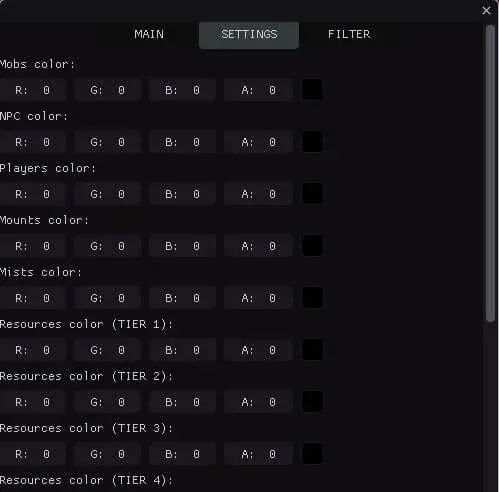
Purchase
Mason for Albion Online: system requirements
About Mason for Albion Online
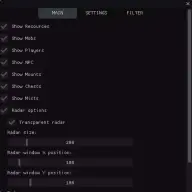
Mason is a radar for Albion Online: mobs, players, NPCs, mounts, chests, mists and resources such as wood, stone, ore and others are shown on the radar. It is a scouting tool with no bots or combat automation.
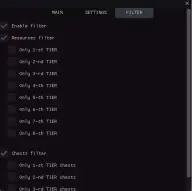
The radar is flexible: transparency, overall size, X and Y position, zoom and the object scan radius. Each object type gets its own colour, and resources get a separate colour for every tier from one to eight. The filter keeps only resources of the tiers you need and chests of levels one to four on the radar.
The radar plays different sounds when players, chests and resources appear, and a separate warning sounds when another player comes closer than the set distance. Windows 10 x64 builds 2004–22H2 on Intel and AMD processors are supported; the game is run in a window, with or without a border. The official client and Steam are supported, the game has its own in-game anti-cheat, and the radar is visible in videos and screenshots.
Features of Mason for Albion Online
- marks mobs so you do not miss farming targets.
- shows wood, stone, ore and other resources.
- shows other players so you can avoid an encounter in time.
- displays NPCs on the radar.
- shows nearby mounts.
- puts markers for nearby chests on the radar.
- shows mists so you don't miss their entrances.
- adjusts how much the radar covers the game image.
- the overall size of the radar window and its offset along the X and Y axes.
- zooms the radar view in and out.
- sets the range within which objects appear on the radar.
- a separate colour for mobs, NPCs, players, mounts, mists and chests.
- a separate color for resources of each tier, from 1 to 8.
- shows only resources of the selected tiers, from 1 to 8.
- keeps only chests of the levels you need on the radar, from 1 to 4.
- a separate sound for players, chests and resources when they appear on the radar.
- a sound alert when another player comes closer than the set distance.
- the distance in metres is shown next to every marker on the radar.
- minimum and maximum display distance; anything outside the range is hidden.
- how many chests, mobs, resources and other targets are on the radar, broken down by type.
- the radar finds the target closest to your character by itself and shows information about it.
- F3 writes the coordinates of every detected object to a text file.
- a timestamped log of finds: first and last detection and how many times an object was seen.
- F1 opens the menu, F2 saves, F3 exports coordinates.
- the config saves itself every 30 seconds.
- chests come first in sorting and, together with artefacts, are marked with pulsing circles and stars.
- lines from the radar centre to objects and arrows showing the direction to them.
- movement paths of objects, with an adjustable trail length.