Mason cheat for Dead by Daylight on Windows
Undetected
Purchase
Mason for Dead by Daylight: system requirements
About Mason for Dead by Daylight
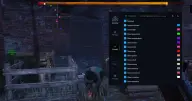
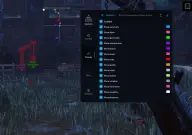
Mason is a cheat for Dead by Daylight that marks survivors and the killer on the map, along with generators, exit gates, the hatch, hooks, pallets, lockers, totems, windows and the creatures some killers summon. Lines to players, distance and a built-in radar that you can move to a convenient spot on the screen make it easier to find your way around.
The aim assist is activated by a key; its radius is set separately and can be shown on screen. Skill checks can be disabled completely, and the interface has a crosshair and a CPU load reduction mode.
The PC must boot via UEFI from a GPT disk, with Secure Boot disabled, Hyper-V turned on and VT-x/VT-d virtualization enabled. The game can be launched from Steam, the Epic Games Store or the Microsoft Store in windowed, borderless fullscreen or fullscreen mode. Windows 10 and 11 (x64, builds 2004 to 26H1) are supported, as are Intel and AMD processors. The game runs Easy Anti-Cheat, and the cheat is not hidden from recordings or screenshots.
Features of Mason for Dead by Daylight
- helps you aim at a target on key press.
- sets the aim activation key.
- sets the zone in which the aim locks onto a target.
- shows where survivors are.
- puts the killer's position on your screen.
- highlights generators.
- shows the exit gates and the hatch for your escape.
- shows where the hooks hang.
- highlights pallets, windows and openings for looping.
- marks lockers you can hide in.
- marks totems, Hex totems included.
- marks creatures summoned by some killers.
- draws lines to players on the screen.
- puts the distance on your screen.
- puts a radar on your screen.
- completely disables skill checks.
- eases the load on the CPU, but the software runs slower as a result.
- adds its own crosshair to the screen.
- shows the aim's area of effect on screen.
- moves the radar along the X and Y axes to a convenient spot.