Covcheg cheat for Delta Force on Windows
Undetected
Purchase
Covcheg for Delta Force: system requirements
About Covcheg for Delta Force
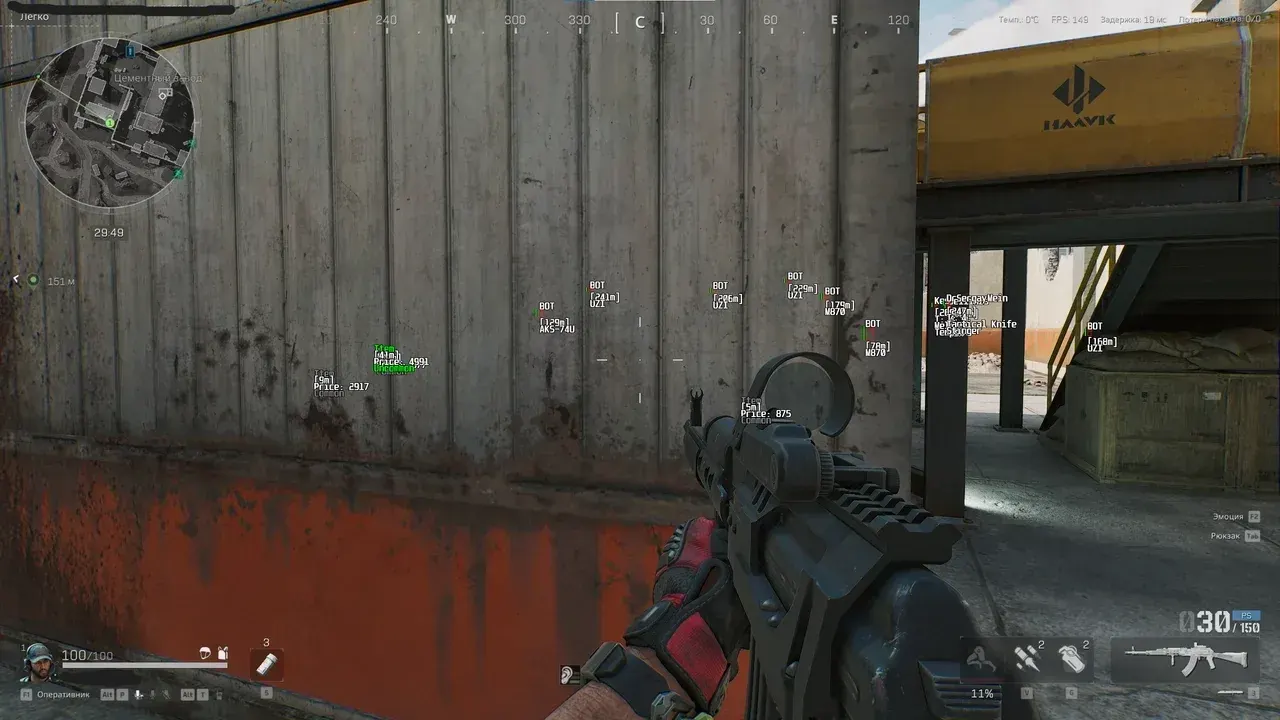
The Covcheg visual cheat shows where enemies, bots and valuable loot are in Delta Force. It has three types of ESP — for players, for bots and for loot.
Players show a box and a separate head box, health, distance, weapon, nickname, agent name and team number, and the visibility check tells you who is open to a shot. Game-controlled bots are highlighted separately, so you can tell them apart from real enemies right away. Loot ESP labels each item with its name, price, quality and distance, and marks death crates and whether an item has already been searched.
It launches from a USB flash drive: requires UEFI BIOS, virtualization enabled and Secure Boot disabled. Supports the Steam version on Windows 10 22H2 and Windows 11, Intel and AMD processors; there is no built-in spoofer and no hiding from OBS recording.
Features of Covcheg for Delta Force
- displays real enemies on screen.
- separately highlights game-controlled enemies.
- a box around the target's model.
- additionally highlights the enemy's head.
- the target's health.
- shows whether the enemy is in direct line of sight.
- the distance to a player, bot or item.
- what the enemy is holding.
- the player's name above the model.
- which operator the enemy has chosen.
- which squad the player belongs to.
- labels detected items.
- the item's value right on screen.
- the rarity of the detected item.
- marks crates with fallen players' gear.
- shows whether an item or crate has already been searched.