Covcheg cheat for Escape from Tarkov on Windows
Undetected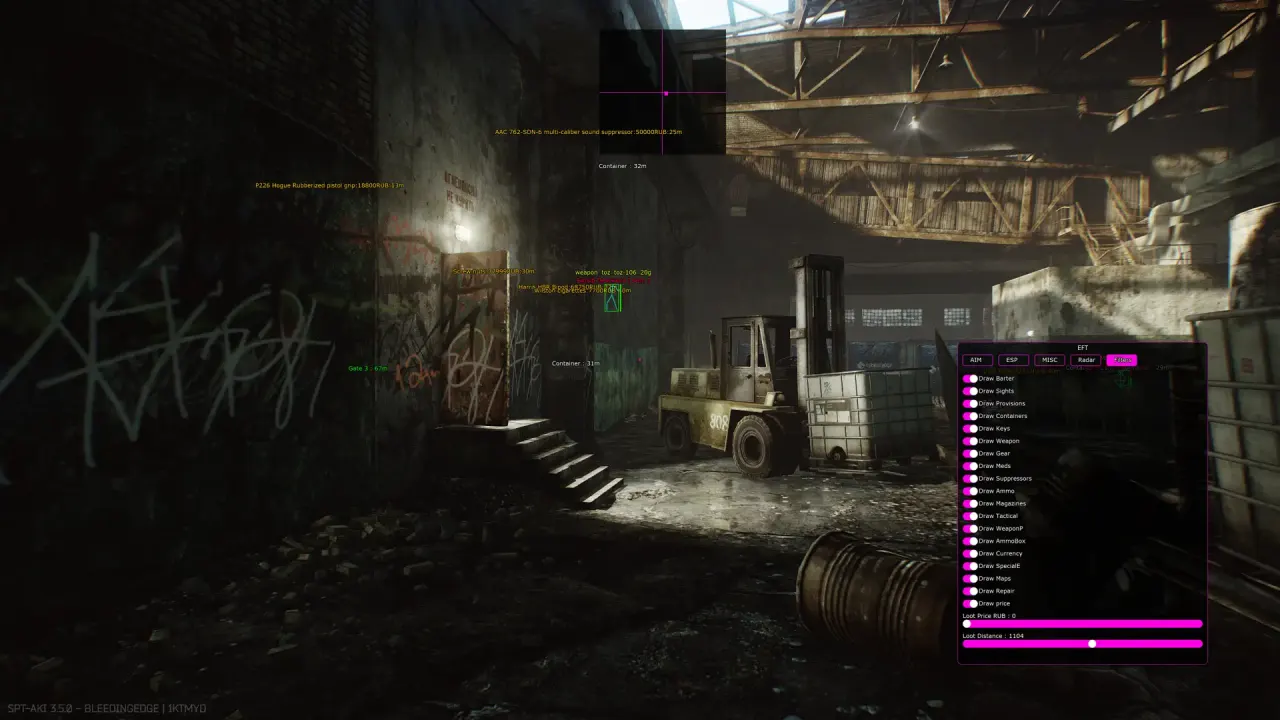
Purchase
Covcheg for Escape from Tarkov: system requirements
About Covcheg for Escape from Tarkov
Covcheg is a cheat for Escape from Tarkov with an aimbot that hits the head or the bone closest to the crosshair. The FOV, its on-screen circle and the activation range are adjustable, and recoil and shake are removed.
The wallhack shows boxes, level, name, weapon, health, skeleton, K/D and target type: PMC, player Scav or AI Scav. Loot and container ESP with prices filters keys, armor, armor plates, stimulants, ammo and meds. The quest helper marks task locations and quest items on Customs, Woods, Reserve, The Lab and other maps. There is an offline PvE mode, third-person view, thermal vision, night vision goggles, fall damage disabling, Silent Melee and a radar.
Covcheg installs on Windows 10 (2004–22H2) and 11 with Intel or AMD, and the game runs in windowed or fullscreen mode through BSG or Steam. A spoofer is built in, and no USB flash drive is needed.
Features of Covcheg for Escape from Tarkov
- turns the aimbot on/off.
- aim activation key.
- shows the aimbot's area as a circle.
- aimbot area.
- aim activation range.
- the aimbot always hits the head.
- the aimbot hits the bone closest to your crosshair.
- disables recoil and shake (adjustable).
- wallhack on players.
- box wallhack.
- shows player level.
- shows player/bot/boss names.
- the gun currently in their hands.
- other players' HP level.
- wallhack drawn as skeletons.
- shows players' K/D.
- shows the player's class (PMC, player Scav, Scav).
- wallhack range.
- turns on thermal vision.
- turns on night vision.
- removes the visor/helmet HUD.
- disables fall damage.
- adjusts the field of view and aspect ratio.
- speeds up the aiming animation.
- lets you enter offline raids.
- turns on third-person view.
- your weapon passes through obstacles.
- instant movement response.
- silent melee kill (knife, baton, etc.).
- shows the map's extracts.
- turns on loot display on the map.
- shows containers/crates.
- shows the container type.
- filters that show only specific items.
- shows item prices (adjustable).
- max distance for showing loot.
- container display distance.
- "Keys" is a display setting in the "Loot & World ESP" section.
- "Armor" is a display setting in the "Loot & World ESP" section.
- "Glasses" is a display setting in the "Loot & World ESP" section.
- "Backpacks" is a display setting in the "Loot & World ESP" section.
- "Chest rigs" is a display setting in the "Loot & World ESP" section.
- "Containers" is a display setting in the "Loot & World ESP" section.
- "Combat stims/injectors" is a display setting in the "Loot & World ESP" section.
- "Ammo" is a display setting in the "Loot & World ESP" section.
- "Headsets" is a display setting in the "Loot & World ESP" section.
- "Mods" is a display setting in the "Loot & World ESP" section.
- "Barter items" is a display setting in the "Loot & World ESP" section.
- "Provisions" is a display setting in the "Loot & World ESP" section.
- "Helmets" is a display setting in the "Loot & World ESP" section.
- "Gear" is a display setting in the "Loot & World ESP" section.
- "Weapons" is a display setting in the "Loot & World ESP" section.
- "Grenades" is a display setting in the "Loot & World ESP" section.
- "Medical" is a display setting in the "Loot & World ESP" section.
- "Armor plates" is a display setting in the "Loot & World ESP" section.
- "Other items" is a display setting in the "Loot & World ESP" section.
- shows markers where quest points are.
- shows where quest items are.
- A feature of the "Quest Helper" section.
- turns off all wallhack except player ESP.
- safely unloads the cheat from the game.
- a radar that shows all players on the map (flexible settings).
- a custom crosshair in the center of the screen.
- arrows pointing to enemies.
- a config system to quickly save your settings and load them the next time you launch the cheat.