
Mason cheat for Battlefield 1 on Windows
Undetected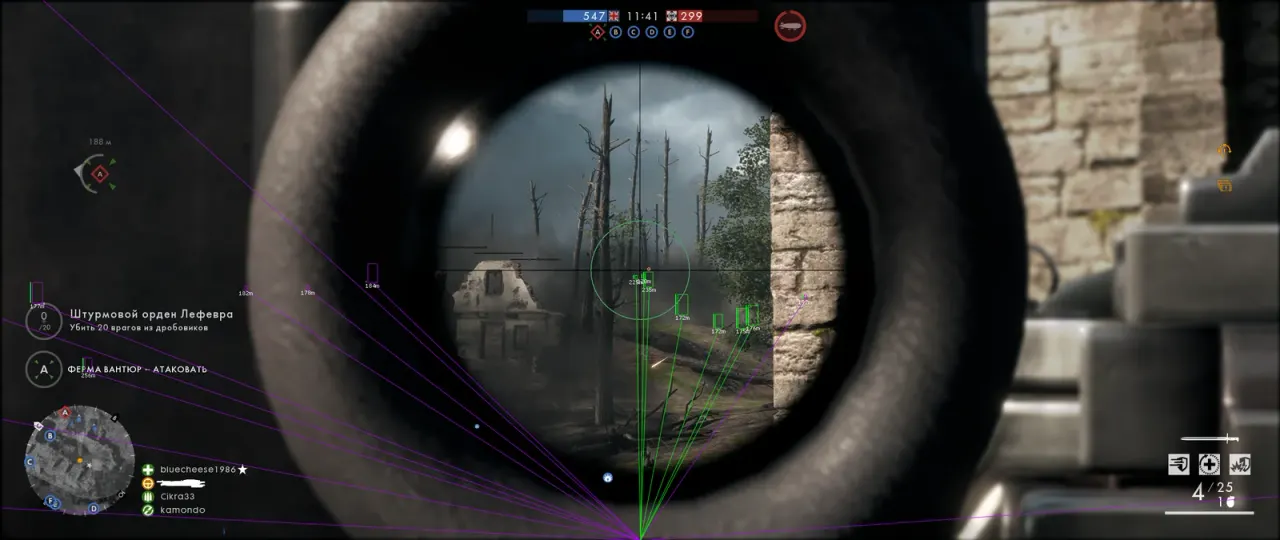
Purchase
Mason for Battlefield 1: system requirements
About Mason for Battlefield 1
Mason for Battlefield 1 is split into four blocks: ESP, Aimbot, Triggerbot and Misc. The aimbot pulls the crosshair onto the target with adjustable smoothness inside the FOV circle and compensates for bullet ballistics. No Recoil cuts weapon recoil by the percentage you choose. So that the cheat does not mix up teammates and enemies, you enter your own nickname in the menu. The triggerbot fires on its own: it has its own radius, a trigger delay and a key picked from a list.
ESP puts a 2D frame (box) around every player, draws a line to them and shows their name, distance and health bar.
Other features are a watermark, an FPS counter and status indicators; the cheat does not show up in videos or screenshots. It runs from Steam or Origin, in windowed mode only, on Windows 10 and 11 x64 (builds 2004–23H2) with an Intel or AMD processor. Supported anti-cheat: FairFight.
Features of Mason for Battlefield 1
- a 2D frame around every player.
- a line is drawn to every player.
- shows how far away each player is.
- a bar that shows how much health a player has.
- player names are shown next to them.
- how smoothly the aimbot moves the crosshair onto the target.
- the target capture zone, marked by the FOV circle.
- the aimbot compensates for bullet ballistics.
- the weapon fires with no recoil.
- sets how much recoil is removed, in percent.
- you enter your own nickname here so the cheat can tell teammates from enemies.
- the pause after which the triggerbot fires.
- the radius within which the triggerbot works.
- the triggerbot key is picked from a drop-down list.
- the cheat's watermark over the game.
- an on-screen frames-per-second counter.
- status indicators in the interface.
- the cheat does not appear in videos or screenshots.