Specter cheat for War Thunder on Windows
Undetected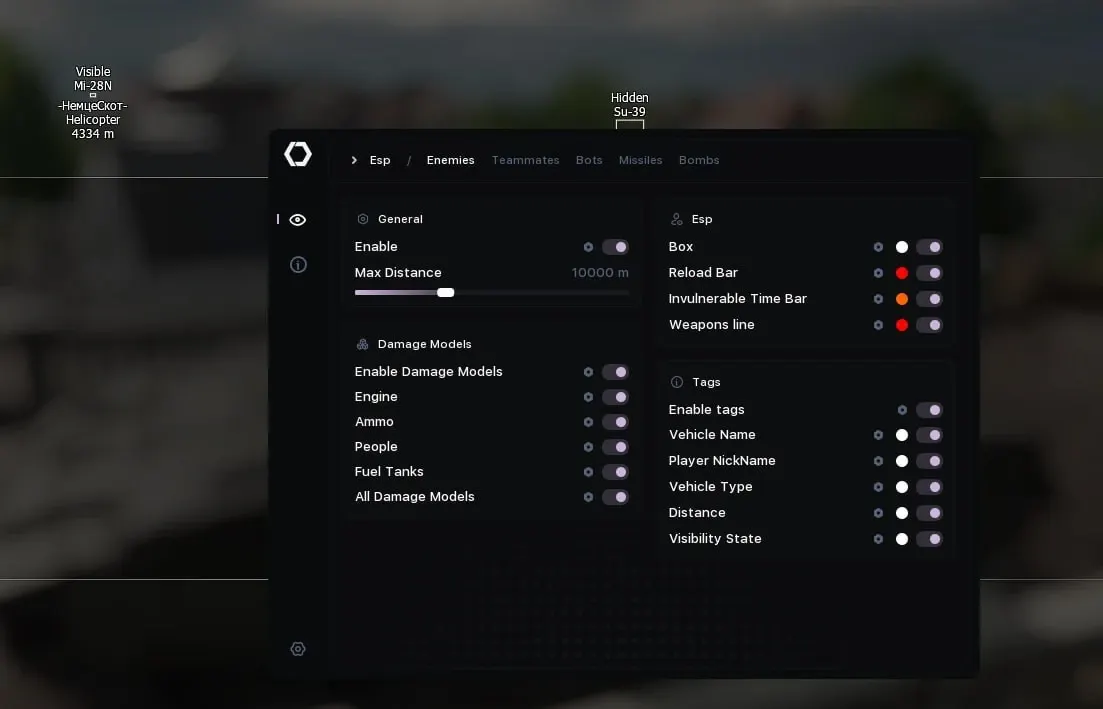
Purchase
Setup instructions
Specter for War Thunder: system requirements
About Specter for War Thunder
Specter is a cheat for War Thunder with vehicle X-Ray, an aimbot and a triggerbot. The aim works while a key is held, on enemies and bots, targets the center, the engine or the ammo, and draws the FOV circle and the lead point. The triggerbot fires when the barrel is aimed at the selected module: the ammo rack, engine, fuel tanks or crew.
Vehicle wallhack: tanks, planes, helicopters and ships in 2D or 3D boxes, reload and invulnerability bars, name, nickname, distance and visibility status. Damage models reveal the crew, modules and ammo rack. The HUD provides a penetration crosshair, a bomb impact point and calculated reticles for rockets, the cannon and the turret; rockets and bombs are tracked, and there is a minimap.
You need Windows 10 or 11 (21H2–26H2), Intel or AMD, and virtualization in BIOS. Any window mode works, no USB flash drive is needed, there is no spoofer, and the overlay can be hidden from screen recording.
Features of Specter for War Thunder
- Enable, Aimbot key (hold), Target enemies, Target bots, Target module (center, engine or ammo), Capture radius (FOV), FOV circle, Lead circle, Lead line, Aim smoothing.
- Enable, Triggerbot key (hold), Auto-fire when the barrel is on target, Target enemies, Target bots, Minimum interval between shots, Fire only on a hit to the selected module (ammo, engine, fuel tanks, crew).
- Impact point marker for the current shot, Marker size, Color on an enemy hit, Color on a map hit, Shot trajectory, Trajectory color.
- Penetration sight at any distance, Small cross over the penetration point, Bomb sight (bomb impact point), CCIP and CCRP for rockets, CCIP and CCRP for the main gun, CCIP and CCRP for the turret.
- Separate settings for enemies, allies and bots, Tanks, planes, helicopters and ships, Maximum display distance, 2D, 2D-corner or 3D box, Reload bar, Invulnerability bar, Vehicle name, Player nickname, Vehicle type, Distance to target, Visibility state (visible, spotted, invisible), Line along each weapon's direction.
- Engine, Ammo, Crew, Fuel tanks (drawing, model, color and outline), All other damage modules, Outline thickness.
- Enable, Maximum display distance, Projectile dot or icon, Icon size, Distance to projectile, Projectile name, Projectile mass, Projectile speed, Bomb flight direction line, Bomb detonation timer bar.
- Minimap window, Background color, Window size, Map display radius, Unit dot radius, Barrel length, Own vehicle, Enemies, Allies, Bots, Missiles and bombs with direction.
- Active vehicles window listing the vehicles in the battle, Include bots in the list, Reports window, Window background and header colors, Window position on screen (X, Y).
- Saved config list, Create a config from current settings, Reset a config to defaults, Refresh the config list, Open the config folder.
- Language (Russian or English), Overlay FPS sync with the game, Overlay V-Sync, Hide the overlay from screenshots and screen recording, Overlay GPU priority (0–30).