Covcheg cheat for PUBG: Battlegrounds on Windows
Undetected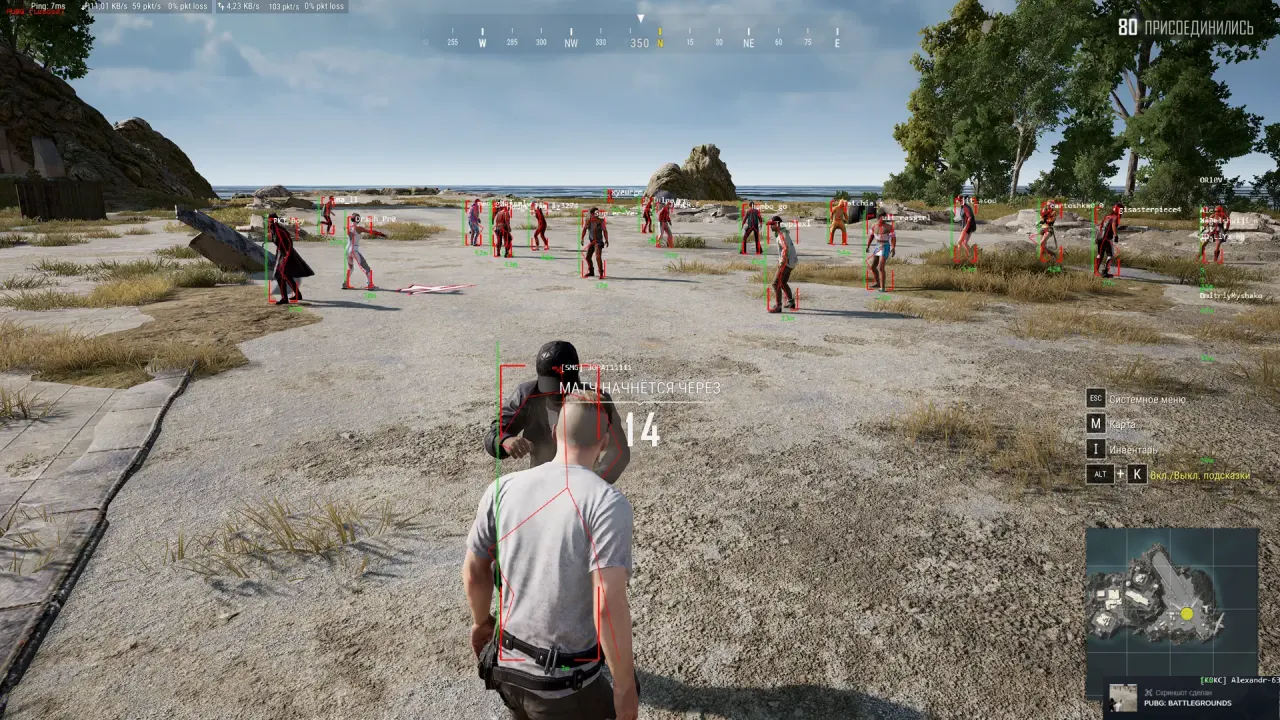
Purchase
Covcheg for PUBG: Battlegrounds: system requirements
About Covcheg for PUBG: Battlegrounds
Covcheg is a cheat for PUBG: Battlegrounds with player wallhack and loot highlighting. Player ESP can be turned on and off right during the game: the screen shows boxes, skeleton, health bar, distance in meters and Team ID, which shows who is playing on the same team. The "enemies only" mode removes the highlighting of allies, and the maximum range is set manually.
Loot ESP is split into groups: weapons, weapon attachments, ammo, armor, meds and boosts, and each of them can be shown or hidden. The Hide Menu function hides the cheat interface, and Unload Hack unloads it from the game.
Compatible with Windows 10 and 11 versions 2004–25H2, Intel and AMD processors, Nvidia, AMD and Intel graphics cards. The game is launched from Steam in windowed or borderless mode. There is no built-in spoofer, and no USB flash drive is required to launch.
Features of Covcheg for PUBG: Battlegrounds
- ESP that shows players and various info about them.
- lets you turn ESP on / off while using the cheat.
- wallhack as boxes, the most popular cheat feature.
- shows player health with a bar.
- shows the distance to targets (in meters).
- lets you limit the range of the COVCHEG cheat.
- with WH on, only enemies are shown, teammates are not highlighted.
- shows players' team ID.
- "Weapons" — display setting in the "Loot ESP (loot wallhack)" section.
- "Weapon attachments" — display setting in the "Loot ESP (loot wallhack)" section.
- "Ammo" — display setting in the "Loot ESP (loot wallhack)" section.
- "Armor" — display setting in the "Loot ESP (loot wallhack)" section.
- "Meds" — display setting in the "Loot ESP (loot wallhack)" section.
- "Boosts" — display setting in the "Loot ESP (loot wallhack)" section.