Ring cheat for Escape from Tarkov on Windows
Updating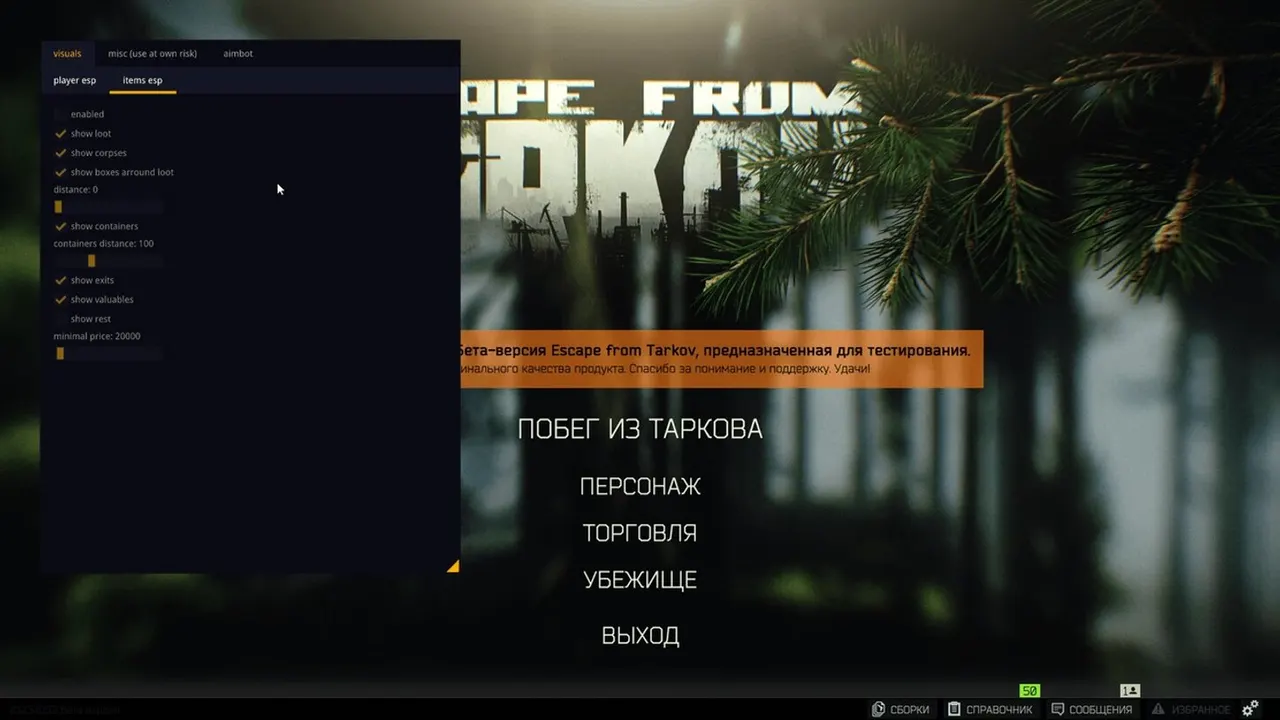

RING is being updated: the developer is releasing a new version. Sales resume as soon as it is out.
Ask about timingRing for Escape from Tarkov: system requirements
About Ring for Escape from Tarkov
Ring is a cheat for Escape from Tarkov with Silent Aim: a shot fired near an enemy still hits them. The aimbot is turned on with a hotkey, and its radius, smoothing, target lock, bone and visibility check are adjustable.
The player wallhack shows level, kill and death stats, health and skeleton, and the render distance is set separately for each element. Loot ESP marks valuables and quest items, extracts are visible, and the contents of containers and corpses can be seen without opening them. There is a flyhack, infinite stamina and faster actions.
It requires Windows 10 (1903–22H2) and an Intel processor from 2015 or newer, except X/XE and Xeon, with a GPT disk only. Windowed, borderless and fullscreen modes are supported, no USB flash drive is needed, and a spoofer is built in. It is not hidden from OBS recordings.
Features of Ring for Escape from Tarkov
- "Aimbot:" helps you track the selected target more precisely based on your aim settings.
- The "Automatically aim at enemies." setting controls the corresponding product option.
- The "Highly configurable!" setting controls the corresponding option of the product.
- Lets you assign a convenient key to turn on aiming during a fight.
- "Aimbot radius" — helps you track the selected target more precisely based on your aim settings.
- "Aimbot smoothing" helps you track the selected target more precisely based on your aim settings.
- The "Target selection" setting controls the matching product parameter.
- The "Lock target" setting controls the corresponding option of the product.
- The "Toggle the delay before aiming at other targets after a kill" setting controls the corresponding product option.
- The "Draw a crosshair in the middle of the screen" setting controls the corresponding product option.
- Draws a guide line to the marked target or object.
- The "Visibility check" setting controls the matching product parameter.
- The "Choose a specific bone" setting controls the corresponding product option.
- "Silent aimbot (you shoot near an enemy and still hit them)" helps you track the selected target more precisely based on your aim settings.
- The "Character ESP:" setting controls the corresponding product option.
- "See all players and more through walls, including key info." shows players in the ESP and helps you keep track of their positions around your character.
- The "Combat mode" setting controls the corresponding option of the product.
- The "Max render distance" setting controls the corresponding option of the product.
- The "max render distance for health bars" setting controls the corresponding product option.
- "Max render distance for player names" shows players in the ESP and helps you keep track of their positions around your character.
- The "Max render distance for other info" setting controls the corresponding product option.
- The "Health bar position" setting controls the corresponding option of the product.
- The "Health bar style" setting controls the corresponding option of the product.
- The "Border style" setting controls the corresponding option of the product.
- The "Enemy visibility check" setting controls the corresponding product option.
- The "Max bone render distance" setting controls the corresponding option of the product.
- The "Bone style" setting controls the corresponding product option.
- "Players" shows players in the ESP and helps you keep track of their positions around your character.
- "Player level info" shows players in the ESP and helps you keep track of their positions around your character.
- "Show player stats (KDA)" shows players in the ESP and helps you keep track of their positions around your character.
- Adds the "Item ESP:" category to the loot filter so you can find the items you need faster.
- Adds the "See all items through walls, including key info." category to the loot filter so you can find the items you need faster.
- The "Show valuables" setting controls the corresponding product option.
- Adds the "Show quest items" category to the loot filter so you can find the items you need faster.
- Adds the "Show loot" category to the loot filter so you can find the items you need faster.